How to Renew or Delete Domain Name(s) in BigRock
How to Renew or Delete Domain Names in BigRock
When we think of domain names, we think of something that we own. Like our house, or our car. In the internet language, we associate domain names as something that is a part of a websites identity. But of course, as do things in the internet, or apparently almost everything in these world, they have expiration dates as well. When we have an intellectual property, it’s always a good idea to keep it up for as much as possible. So, here in Hosting Decisions, we will show you how to renew or delete domain names in BigRock.
1. Login to your account at BigRock from the main page. To do this, you have to hover over the  icon and choose My Account. You will be redirected to a new page. Once there, key in your login credentials such as your username and password in their respective fields.
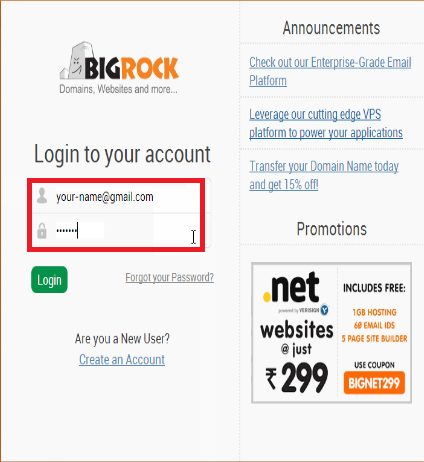
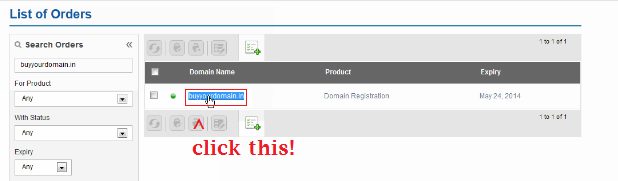
2. Once done, you will be redirected to a page that lists all your purchases you had with the account.
3. Next, click the domain you wish to renew. After doing so, you will be redirected towards the information of the domain.
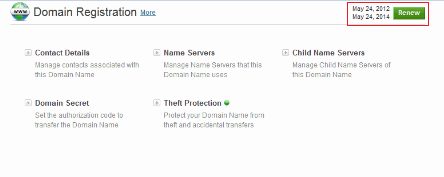
4. Click the “Renew” button that is located right next to the origin and the expiration date of the domain.
5. Choose the number of years you want renew your domain’s expiration date.
6. After choosing the number of years, you can then click the “Renew Domain Name” button.
7. You will be then prompted to choose the method of payment you’re going to use. Select the desired option and click on continue.
8. Make the payment and voila, your domain is officially renewed!
Choosing Names
In choosing names, it’s possible that we could pick a bad-sounding name or the wrong name perhaps for the intent and purpose of the website. And since having these domains means having to pay for it, it definitely frustrates people since we’re not really getting our money’s worth. But don’t worry, they offer ways to renew or delete domain names in BigRock while getting your money back. But of course these service costs $1. So let’s get right on to it.
1. Login to your account at BigRock from the main page. To do this, you have to hover over the icon and choose My Account. You will be redirected to a new page. Once there, key in your login credentials such as your username and password in their respective fields.
2. Once done, you will be redirected to a page that lists all your purchases you had with the account.
3. Next, click on the domain you wish to delete. After doing so, you will be redirected towards the information of the domain.
4. Next, select “Delete Order”. But do take note that this option will ONLY APPEAR IF the registered domain is still in the Money Back Period (more on that later).
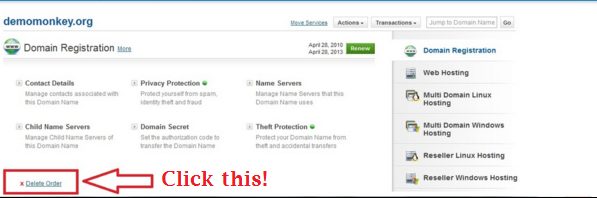
5. Click on confirm to delete the domain. It will take a few minutes, but the domain name will instantaneously be deleted from the database and be once again open for registration. You should expect a refund within 15 business days.
Money Back Grace-Periods
Earlier, it was mentioned that a certain option will ONLY APPEAR if the domain name is still in the Money Back Period. Lucky for you, we have a list of Money Back Grace-Periods to guide you upon how many days some certain domain extensions can be refunded.
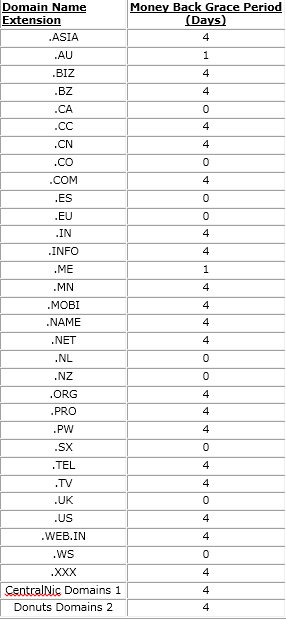
And that ends the tutorial on how to renew or delete domain names in BigRock. We hope you find this guide as helpful as a Boy Scout helping an elderly cross the street!



Related Posts